
MongoDB Backup & Restore Web Application
Secure and Lightweight Fullstack Architecture
MongoDbUtils is a fullstack application for managing MongoDB backups and restores. It lets you configure databases to back up, run backups on demand or on a schedule, restore existing dumps, and download backups from the browser. The application is built with security in mind: encrypted credentials, password-based authentication, rate limiting, and a strict Content Security Policy. It is designed for easy deployment on a VPS via Docker or Coolify.
Technical Stack
Frontend:
- React 18 + TypeScript
- Vite for build and development
- Tailwind CSS 4
- Redux Toolkit for state management
- RTK Query for API calls
- French UI (i18n-ready)
Backend:
- Fastify (Node.js HTTP framework)
- TypeScript (tsup for build)
- MongoDB Database Tools (mongodump, mongorestore)
- AES-256-GCM encryption for URIs and config
- node-cron for scheduled backups
- archiver for on-the-fly tar.gz archives
Deployment:
- Single Docker image (backend + frontend + MongoDB Database Tools)
- Coolify-compatible with HTTPS and reverse proxy
- Persistent volumes for config and dumps
Security and Authentication
- Authentication required (no anonymous access)
- JWT stored in HTTP-only cookie (XSS mitigation)
- Secure cookie in production (HTTPS only)
- SameSite=strict to reduce CSRF risk
- Rate limiting: global (100 req/min) and login-specific (5 attempts / 15 min per IP)
- Security headers via Helmet (X-Frame-Options, CSP, etc.)
- Strict CSP without unsafe-inline for styles
- Path traversal protection on the download endpoint
- URIs and secrets never returned in clear text by the API
Main Features
Backup jobs:
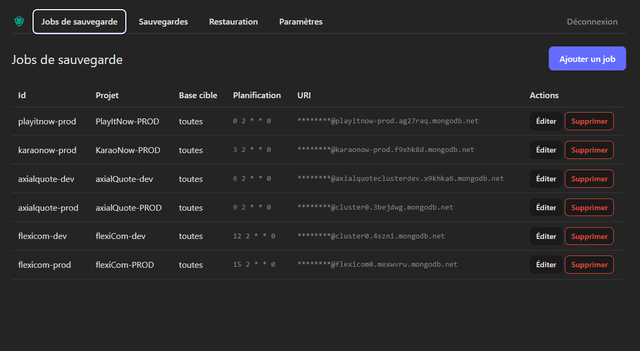
- Add, edit, and remove databases to back up
- Fields: project name, target database (or all databases), MongoDB URI, format (gzip archive or directory)
- Connection check before saving
- Cron scheduling (e.g. daily at 2am, every 6 hours)
- Automatic execution of scheduled backups via node-cron
Backups:
- Manual trigger per database or for all databases
- Status of the last backup
- List of available dumps (database, name, date, size)
- Download from the browser: direct file for archives, tar.gz generated on the fly for directories
Restoration:
- Select target database and dump (from backup list)
- Optional drop (overwrite existing collections)
- Restoration status display
Settings:
- Dump output directory
- Retention days (automatic removal of old dumps)
- Custom paths for mongodump and mongorestore
Configuration & Storage
- JSON config (backup-config.json) with encrypted credentials
- Encryption key via APP_ENCRYPTION_KEY environment variable
- MongoDB URIs encrypted at rest, decrypted only on the backend
- Config file created automatically on first launch
Deployment
- Build: docker build -t mongodb-utils .
- Run: mount volumes /app/data (config) and /app/backup (dumps)
- Environment variables: APP_ENCRYPTION_KEY, ADMIN_PASSWORD, etc.
- Coolify: build from Git, domain, HTTPS, health check
Roadmap
- S3 and SFTP storages for sending backups to remote destinations
Resources:
- Private project : no resource